Creating and Setting up a custom UAbilitySystemGlobals class.
Updated for UE 5.8: the class is now normally selected in Project Settings under Gameplay Abilities Settings (
UGameplayAbilitiesDeveloperSettings); the ini approach below still works because it reads the same config section. Also,InitGlobalData()is called for you, so you no longer call it manually.
This class is crucial for any game utilizing the Gameplay Ability System (GAS). I recommend every serious game make their own subclass of UAbilitySystemGlobals. It is the class responsible for setting up the core GAS global data, and below I provide a few reasons why you would want to create your own.
- Allows you to initialize global tags which can be used in native code (override
InitGlobalTags). - Allows you to change what stuff gets initialized into GameplayCue Parameters (the
InitGameplayCueParametersoverloads). - Allows you to change what class you want to use for the AttributeSet Initter (
AllocAttributeSetInitter). - Allows you to change what class your EffectContext uses (
AllocGameplayEffectContext). - Allows you to change what class your AbilityActorInfo uses (
AllocAbilityActorInfo).
There are also many more reasons, but these are the most common ones. With that in mind, let us get to creating and setting up our own custom UAbilitySystemGlobals for our project.
In the Unreal editor, you need to create your AbilitySystemGlobals class for your game:
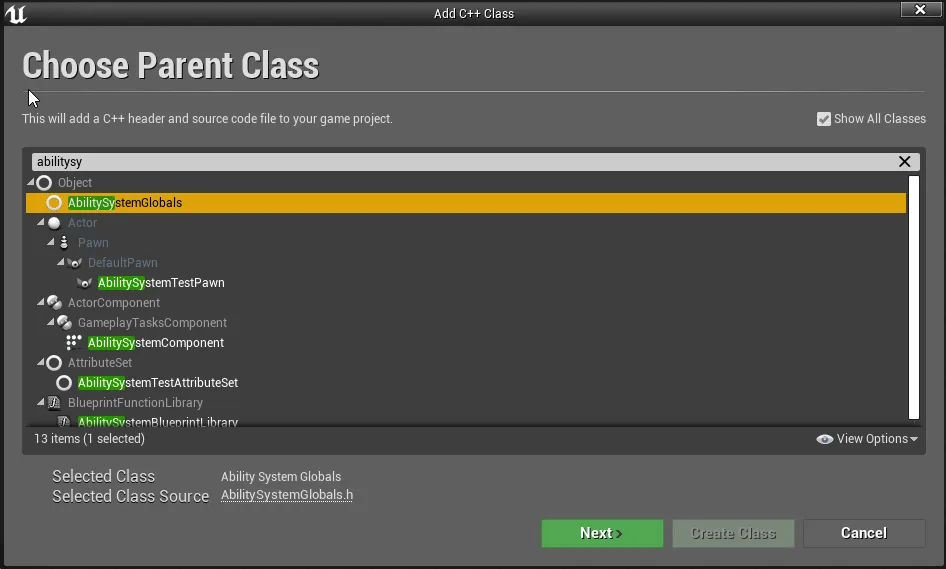
Once you have your new class, we need to tell GAS to use it. The easiest way is in the editor: open Project Settings, go to Gameplay Abilities Settings, and set “Ability System Globals Class” to your class. This is a config value that needs an editor restart to take effect.
That setting is stored in DefaultGame.ini, so you can also go ahead and open that and add the following lines to it, taking note to use your game module name and your class name without the U.
[/Script/GameplayAbilities.AbilitySystemGlobals]
+AbilitySystemGlobalsClassName="/Script/Kaos.KaosAbilitySystemGlobals"
Where Kaos is your game module name, and KaosAbilitySystemGlobals is the class without the U. i.e. if your project is ShooterGame and your class was USGAbilitySystemGlobals, then the above would be
/Script/ShooterGame.SGAbilitySystemGlobalsWith that done, restarting the engine will now load your own game specific Ability System Globals class.
Notes and gotchas:
- Many of the properties that used to live on
UAbilitySystemGlobalsitself (the globals class name, the gameplay cue manager class, the global attribute defaults tables, etc.) are deprecated there as of 5.5 and are configured throughUGameplayAbilitiesDeveloperSettingsinstead. The ini section name is unchanged, so existing config keeps working. UAbilitySystemGlobals::InitGlobalData()is called automatically the first time the globals are requested. Older tutorials tell you to call it yourself from your asset manager or game instance; you no longer need to, and calling it again is harmless as it returns early if already initialized.- Override the virtual functions you need on your subclass (
InitGlobalTags,AllocAbilityActorInfo,AllocGameplayEffectContext, etc.). See the custom Ability Actor Info post for an example.